
 FNAF Games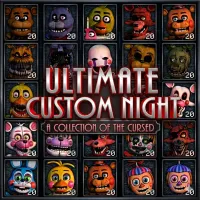














Ultimate Custom Night is a special entry in the Five Nights at Freddy's universe where players take full control of their own challenge. Instead of following a fixed story, you decide who appears, how hard they are, and how intense each night becomes. Your goal is simple: survive from midnight until 6 AM inside a locked office filled with unpredictable threats.
HOW TO PLAY ULTIMATE CUSTOM NIGHT
In Ultimate Custom Night, you are placed in a small office and must survive waves of animatronics from across the FNAF series. The game gives you full freedom to customize your match before it begins. You choose which characters are active and set their difficulty levels. Once the night starts, you must manage multiple systems while reacting quickly to different threats. Each night becomes a unique survival test based on your setup.
Core Survival Objectives
- Survive from 12 AM to 6 AM
- Monitor cameras and multiple tracking systems
- Manage doors, vents, and office defenses
- Control power usage and temperature levels
- React quickly to different animatronic behaviors
Every decision affects how long you can stay alive.
MAIN FEATURES OF ULTIMATE CUSTOM NIGHT
- Full Customization System: You can select dozens of animatronics and adjust each of their difficulty levels, creating countless unique gameplay combinations.
- Multi-System Management: You must handle several systems at the same time, including camera monitoring, ventilation tracking, power and temperature control, and door defense systems.
- Large Roster of Characters: The game includes a massive lineup of animatronics from across the FNAF series, each with distinct behavior patterns and roles.
- Dynamic Difficulty: Every character can be set from inactive to extremely aggressive, letting you build both beginner-friendly runs and high-intensity challenges.
- High Replay Value: Since you can change settings every time, each night feels different, offering endless replayability and fresh experiences.
Controls
- Mouse: Navigate cameras, interact with UI, use items
- Keyboard (A / D / W / F): Control doors and vents
- Number keys (1-6): Manage systems like power and temperature tools
- Space / shortcuts: Quickly toggle key systems
Fast reactions and memorized controls are very important at higher difficulty levels.
RELATED GAMES


